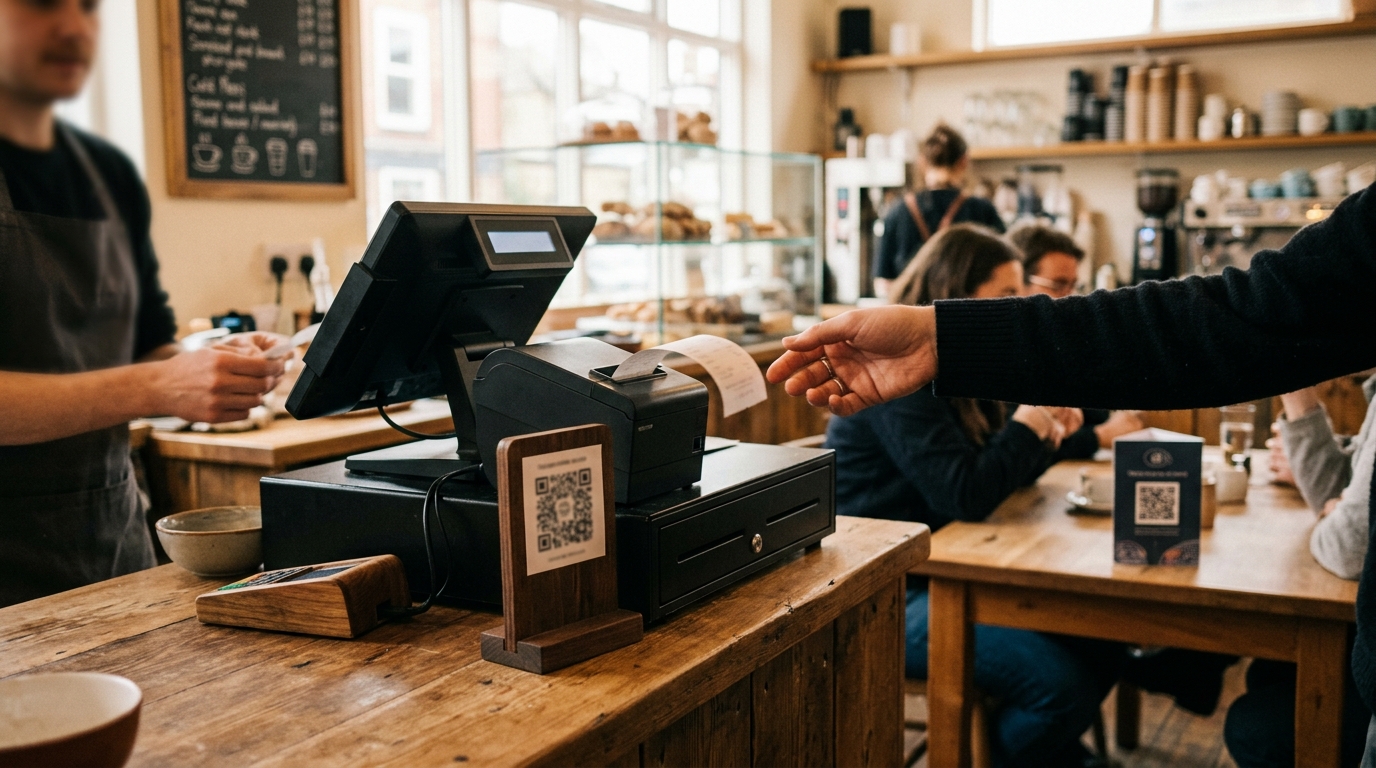
The best place for a feedback code is wherever a customer has a few spare seconds, a phone in reach and a reason to think about the visit. For most service businesses that means two or three places, not one: a code at the point of payment or at the table, and a link sent after the visit for customers who have already left. No single placement works everywhere, so the practical approach is to choose by branch format, try it and look at which locations produce messages.
This guide compares the options, sets out rules for good placement, and covers who decides what.
What the choice depends on
Three things shape where a code should go.
- When the customer is free to look. Someone waiting for a coffee has time. Someone carrying a tray does not.
- Whether they have their phone to hand. Most do, though not always in the moment you want them to.
- How they feel about the visit at that point. The same customer is in a different mood at the table, at the till and the next day.
The options
At the counter or till
A code on a small stand or sign near the point of payment.
Good for: businesses where customers wait, such as coffee, retail, pharmacies and salons at reception. Watch for: clutter. A code competing with promotions, a card reader and menu boards gets ignored. Keep it at eye level and uncovered.
On the table
A code on a stand, card or the menu itself.
Good for: sit-down food and drink, waiting rooms, and anywhere the customer stays for a while. Watch for: tables that are cleaned and reset constantly. Cards go missing or get stained, so check them often.
On the receipt or invoice
A code or short link printed on the receipt, the bill or the paperwork.
Good for: retail, services with paperwork, and auto service. The customer has the receipt in hand and may look at it later. Watch for: printing quality. A code that is too small or low-contrast will not scan. Test on several phones.
A link sent after the visit
The business sends the location's link from its own tools, such as email, WhatsApp or text, after the visit.
Good for: businesses that already have a way to contact customers, and for customers who did not notice the code. This reaches people who have left and had time to think. Watch for: permission. You need permission to contact the customers you send the link to, and that varies by channel. A contact in a customer system is not automatically permission on every channel. Send the link to everyone you are allowed to contact after a visit, not a filtered list.
On a screen or at the door
A code on a screen, a window sticker or an exit sign.
Good for: places where people queue or leave, such as gyms, clinics' reception areas and showrooms. Watch for: glare, distance and whether customers can stop to scan.
Staff mention it
A short spoken invitation at the end of the visit.
Good for: any format, because it explains why the code is there. It also turns a sign into a request. Watch for: how staff do it. If they ask only customers who look happy, the signal is biased. The ask should be the same for everyone.
Rules that apply to every placement
- Put it where the customer is already looking, at the moment they are free.
- Say what it is for in a few words that make sense to a customer, such as "Something not right? Tell head office."
- Use the same wording and the same experience at every branch, so messages can be compared.
- Make the code large enough, high enough in contrast and tested on several phones.
- Do not require an app or an account.
- Check each location in person. Stand where the customer stands and see whether you would notice it.
- Replace worn or missing signs. A faded code is a silent branch.
- Do not offer a reward for sending a message. Incentives distort what you hear.
Who decides, and who does what
Head office decides where the code goes, whether staff mention it and who owns the callbacks. Branch teams place it and keep it visible. Software supplies the code, the link and the page the customer sees. It cannot make customers look at it.
That division matters for rollout. If placement is left entirely to each branch, you get different results for reasons that have nothing to do with service, and the comparison between branches becomes unfair. Agree a standard, allow for format differences and check.
Test, then compare
You will not know in advance which placement works for your branches, and neither will anyone else.
- Choose one or two placements per branch format.
- Run for a set period, such as a few weeks.
- Check which locations produced messages, and which did not.
- For quiet branches, look at placement before drawing any conclusion about customers.
- Adjust and repeat.
Whether enough customers send messages to make the branch view useful is the first thing every rollout finds out. Treat placement as the first variable to test, not a fixed decision.
Common mistakes
- One code in one place for the whole branch, hidden behind a display.
- A code at a spot where customers cannot stop, such as a busy walkway.
- Tiny codes printed at the bottom of a receipt.
- Placing it once and never checking it again.
- Letting each branch invent its own wording.
- Sending the link only to customers who seemed satisfied.
- Treating a quiet branch as a satisfied branch before checking its placement.
Where Outhentik fits
Each location in Outhentik gets its own code and link the moment it is added. The code downloads as a print-ready file, and the link can be sent after a visit from your own email, WhatsApp or text tools. The customer sees the same page either way, with no app and no account, and chooses whether someone may contact them. A branch that sends nothing shows as unknown on the daily brief, which tells you where to check placement first.
Frequently asked questions
Where is the best place to put a customer feedback code?
Where customers are free to look at the right moment: at the till or counter, on tables, on receipts, and in a link sent after the visit. Most businesses use more than one.
Should I use a code or a link?
Both, if you can. A code reaches customers while they are present, and a link reaches those who have left. They lead to the same page.
Do customers need to download an app?
Not with Outhentik. They scan the code or open the link in their phone's browser.
Can I send the link by WhatsApp or email?
Yes, from your own systems, to customers you have permission to contact on that channel. Check the rules for each channel before you send.
Should staff ask customers to use it?
A short, consistent invitation to every customer helps. Do not ask only the customers who seem happy, and do not offer anything in return.
How do I know if a placement is working?
Compare which locations produce messages. A branch with none may have a placement problem, so check it in person before drawing conclusions about its customers.
Who is responsible for keeping the code visible?
Head office sets the standard, and the branch team keeps it in place. Check regularly, because worn or missing signs are a common reason for silence.
Try Outhentik free for 7 days, no credit card required
Outhentik gives head office a direct line from customers at every branch: a case with an owner for each customer who asks to hear back, every message read the same way, and a daily view of which problems repeat and where. For a group deciding where to put the code, it supplies a code and link per location and shows which branches stay quiet.